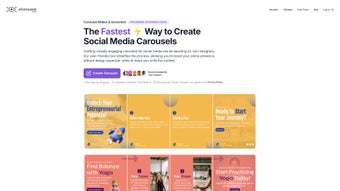

Download AIcarousels – Free AI Carousel Designer for Social Media
Overview
AIcarousels is a cloud‑based design assistant that targets marketers, content creators, and small business owners who need eye‑catching carousel posts without the steep learning curve of traditional graphics suites. Hosted at AIcarousels.com, the service is completely free – there are no hidden subscription fees, no trial periods, and no credit‑card required to start creating. What makes the platform stand out is the built‑in AI Writing Assistant, which transforms a short brief into polished slide copy, headlines, and calls‑to‑action.
Coupled with a library of over 30 pre‑designed templates optimized for LinkedIn, Instagram (feed and Stories), TikTok, and Facebook, users can produce professional‑looking carousel posts in a matter of minutes. The tool automatically adjusts color palettes and font pairings across all slides, ensuring brand consistency with a single click. Finished carousels can be exported as high‑resolution PDFs for print‑ready distribution or as individual JPG files ready for immediate upload to any social channel.
While AIcarousels does not replace a full‑blown design program, it fills the niche for fast, secure, and cost‑free carousel creation, making it an essential addition to any social media workflow.
Key Features & Benefits
- AI Writing Assistant: Generates slide‑level headlines, bullet points, and calls‑to‑action from a brief description.
- Extensive Template Library: More than 30 ready‑made carousel layouts tailored for LinkedIn, Instagram Feed, Instagram Stories, TikTok, and Facebook.
- Brand‑Ready Color & Font Sets: Curated palettes and typefaces automatically propagate across every slide.
- Auto‑Resizing Engine: Images, text boxes, and icons adapt instantly to the chosen layout, eliminating manual alignment.
- One‑Click Export: Download as multi‑page PDF or individual JPG files with a single click.
- Template Saver: Save custom layouts to a personal library for reuse in future campaigns.
- Responsive Web Interface: Works in any modern browser – no installation required.
- Secure Cloud Processing: All data is transmitted over HTTPS and is not stored permanently without user consent.
Each of these features contributes to a streamlined workflow that reduces the time required to create carousel content from hours to under ten minutes for a typical project. The AI Writing Assistant, for example, cuts down copywriting time dramatically; users who would normally spend 15‑20 minutes drafting slide text can generate a full draft in under a minute, then simply edit for tone or brand‑specific language. The template library removes the need for design expertise, while the auto‑resizing engine guarantees pixel‑perfect alignment regardless of how many slides are added. Together, these capabilities enable marketers to maintain a consistent visual identity across multiple platforms without hiring a dedicated designer, thereby lowering operational costs and accelerating content calendars.
Installation, Compatibility & How to Use
Because AIcarousels is entirely web‑based, there is no traditional installation process. Users simply open a modern browser, navigate to AIcarousels.com, and register with an email address or a Google account. After confirming the email, the dashboard presents a prominent “Create New Carousel” button. Clicking this button launches a guided workflow that begins with platform selection; the system automatically loads the appropriate slide dimensions (for example, 1080 × 1080 px for Instagram feed or 1080 × 1920 px for Instagram Stories).
The next step requests a short brief describing the carousel’s purpose—such as “Announce Q4 sales results” or “Share a quick Photoshop tip.” The AI Writing Assistant processes this input and returns a draft for each slide. Users can edit, reorder, or replace the generated text, ensuring the final copy matches brand voice and messaging goals. Once the copy is finalized, the visual stage begins: pick a template, adjust the color scheme to match brand guidelines, and drag‑and‑drop any images or icons. The auto‑resize engine guarantees that every element stays perfectly aligned, even when the free tier’s limit of ten slides is reached.
AIcarousels runs on any device with a modern web browser, making it universally compatible across operating systems. Whether you are on Windows 10/11, macOS Ventura, Chrome OS, or a Linux distribution, the platform works flawlessly in Chrome, Edge, Firefox, and Safari. Mobile users on iOS 15+ or Android 11+ can also access the full feature set through the mobile browser, although the design canvas is best experienced on a desktop screen. Because the application is cloud‑based, there are no heavy local resource demands; an active internet connection and a browser that supports HTML5 and WebGL are the only requirements.
After the design is complete, clicking the “Export” button opens a modal that lets users choose between PDF (ideal for multi‑page review or print) and JPG (ready for direct upload). The download starts instantly, and the files can be posted to any social channel without additional conversion steps. For recurring campaigns, the “Save Template” option stores the layout and placeholder content in a personal library, allowing new carousels to be generated in minutes by simply swapping out the AI‑generated text. This end‑to‑end workflow—from sign‑up to export—provides a rapid, secure, and cost‑free solution for social media teams that need to move quickly.
Pros & Cons
Pros
- Completely free with no hidden costs or subscription traps.
- AI‑driven copy generation accelerates content creation.
- Extensive template library and brand‑ready color/font sets keep designs professional.
- One‑click export to PDF or JPG eliminates extra conversion steps.
- Fully browser‑based; no software download or regular updates required.
- Secure HTTPS processing and optional template saving protect brand assets.
Cons
- Lacks advanced design features such as custom vector editing or animation.
- No real‑time collaboration or team sharing workspace.
- Free tier limits carousel length to 10 slides and may introduce a watermark in the future.
- AI copy generator may need manual tweaking for niche industry jargon.
- Performance depends on internet speed; slow connections can cause lag.
Frequently Asked Questions
Is AIcarousels really free or are there hidden fees?
AIcarousels is 100 % free for the core features described in this review. You can create, export, and save templates without any subscription. A premium plan may be introduced later for advanced collaboration tools, but the current offering has no hidden costs.
Can I use AIcarousels on my mobile phone?
Yes. The platform works in any modern mobile browser (Safari on iOS or Chrome on Android). While the full design canvas is more comfortable on a desktop, you can still generate copy, pick templates, and export images directly from your phone.
How does the AI Writing Assistant generate content?
You provide a short brief – a few keywords, a goal, or a target audience. The AI model, trained on millions of social media posts, expands that brief into slide‑by‑slide headlines, bullet points, and calls‑to‑action. The output is editable, so you can fine‑tune tone or add brand‑specific language.
What export formats are supported?
AIcarousels lets you download your carousel as a multi‑page PDF (ideal for print or sharing with stakeholders) or as individual high‑resolution JPG files (ready for direct upload to Instagram, LinkedIn, TikTok, etc.).
Is my data safe when I use the service?
All communication between your browser and AIcarousels.com is encrypted with HTTPS. The platform does not permanently store your content unless you explicitly save a template to your personal library. You can also delete saved templates at any time.
Conclusion & Call to Action
For marketers, freelancers, and small business owners who need to produce carousel posts quickly, AIcarousels delivers a compelling blend of AI‑powered copy and ready‑made design templates—all without costing a penny. The tool removes the intimidation factor of traditional design software, allowing non‑designers to maintain a polished visual identity across LinkedIn, Instagram, TikTok, and beyond. While power users may miss deeper editing capabilities and collaborative workspaces, the core experience is smooth, secure, and perfectly suited for the fast‑paced world of social media marketing.
Ready to level up your carousel game? Visit AIcarousels.com now, sign up for a free account, and start creating professional‑grade carousels in minutes. Don’t let design bottlenecks slow your content calendar – let AIcarousels do the heavy lifting while you focus on strategy and engagement.
Pros: Free, AI copy generator, ready‑made templates, easy export, cross‑platform.
Cons: No advanced vector tools, limited collaboration, slide limit on free tier.



.png)



